
How to Connect ChatGPT with LINE OA for Thai Businesses (Free!)
How-to GuideLINE Official Account (LINE OA) is the main channel Thai businesses use to reach customers. The problem? You can't reply fast enough when many customers message at once, and repetitive replies exhaust your staff. This guide teaches you how to connect ChatGPT to your LINE OA — for free, with no coding, in just 15 minutes.
Unlike generic template chatbots, ChatGPT understands context and responds naturally in Thai. When a customer asks "I didn't receive my order. Can I get a refund?" at 2 AM, your AI replies instantly with the correct refund policy — no staff required. We use only free tools: LINE Official Account, OpenAI API, and Make (Integromat).
Who is this for? Thai business owners, digital marketers, and startup teams who want to automate LINE conversations without hiring developers. If you can copy and paste an API key, you can follow this guide. Need help? Check out our IT consulting services.
What You Need (All Free)
You don't need a credit card or coding degree. Gather these three free accounts before starting:
- LINE Official Account: Free developer trial handles up to 1,000 friends. Perfect for testing before business verification.
- OpenAI Platform Account: New users receive free API credits valid for 3 months. GPT-3.5-turbo costs less than 1 baht per 100 replies.
- Make (Integromat) Account: Free forever plan includes 1,000 operations monthly — enough for a small shop's daily inquiries.
💡 Pro Tip: Keep your API key in a password manager. Never paste it into chat apps or shared documents. One leaked key can drain your OpenAI credits within hours. Set a billing cap at OpenAI → Billing → Usage limits.
Step 1: Prepare the Accounts You Need
Create a LINE Official Account
If you don't have a LINE OA yet, go to manager.line.biz, sign up for free, then navigate to Settings → Messaging API and enable the channel. Choose "Developer Trial" if you haven't registered a company yet — it gives you full messaging features without immediate verification.
Once inside the Messaging API tab, generate a Channel Access Token (long-lived). Copy this immediately and store it safely. You'll paste it into Make in Step 2. This token acts as the password allowing Make to send messages on your LINE OA's behalf.
Get an OpenAI API Key
Head to platform.openai.com → create an account → go to API Keys → click Create new secret key → copy and save it immediately (shown only once!).
The OpenAI free tier gives you $5–$18 in starter credits, which translates to thousands of Thai-language conversations. Navigate to Billing → Usage limits and set a hard cap (e.g., 500 THB equivalent) to prevent accidental overages if your bot goes unexpectedly viral during a flash sale.
Step 2: Connect via Make (Free!)
Make (formerly Integromat) is a no-code automation tool. The free plan gives you 1,000 operations per month — plenty for a small business.
We chose Make over Zapier for this tutorial because Make's free tier allows multi-step scenarios with unlimited modules, whereas Zapier locks multi-step Zaps behind a paywall. Make's visual drag-and-drop interface also makes debugging easier — you can see exactly where a message gets stuck in the pipeline, turn individual modules on and off, and re-run historical data to test fixes.
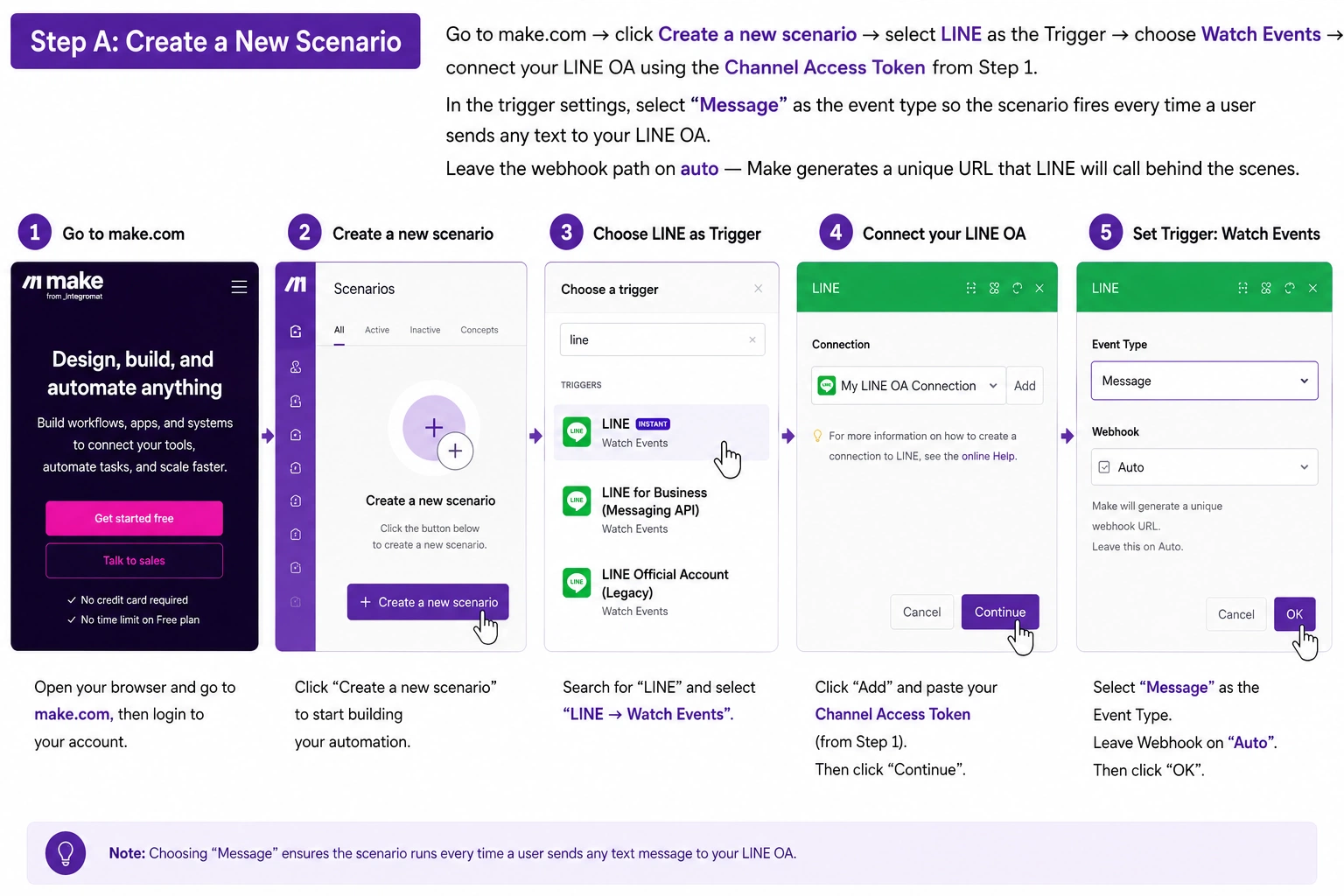
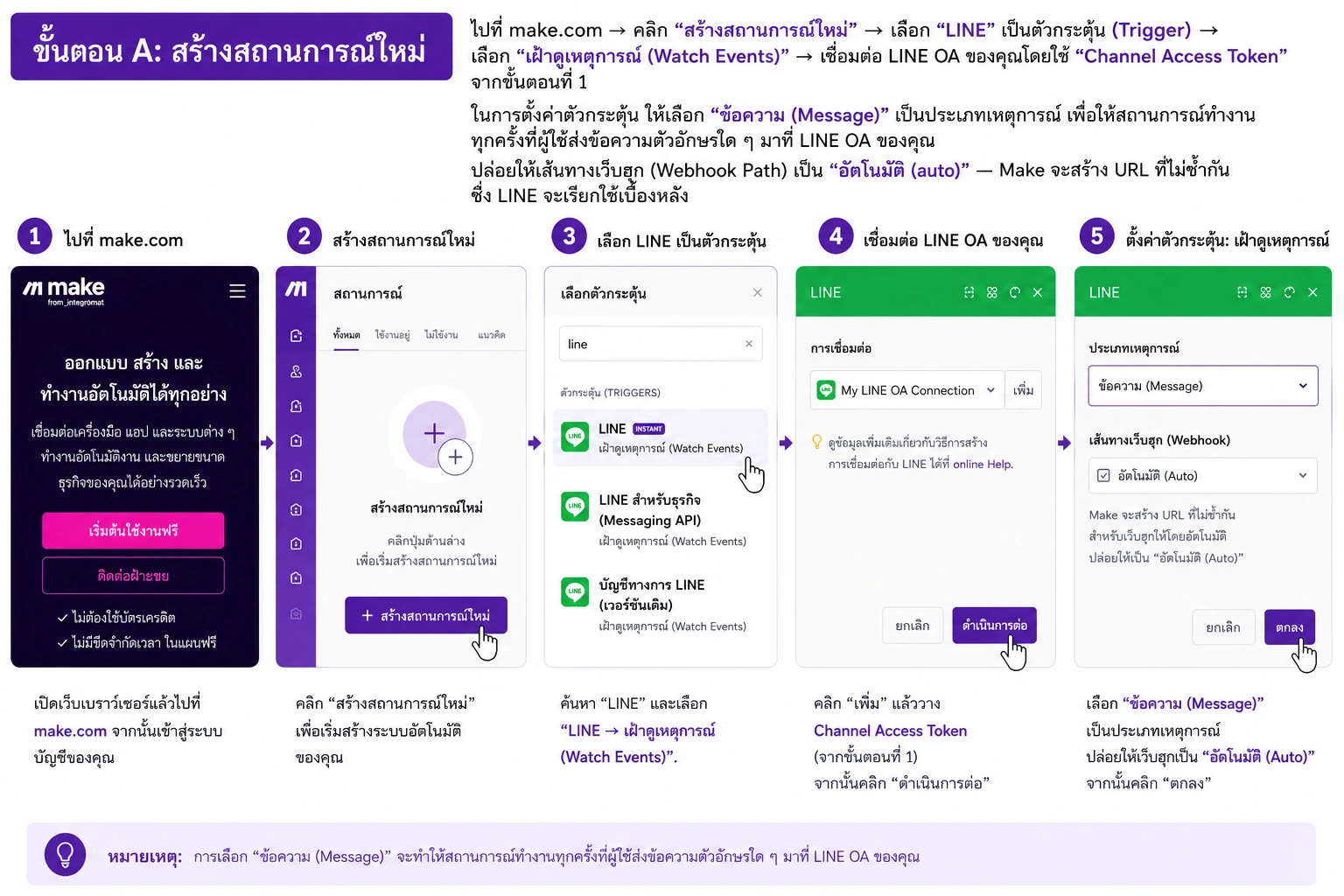
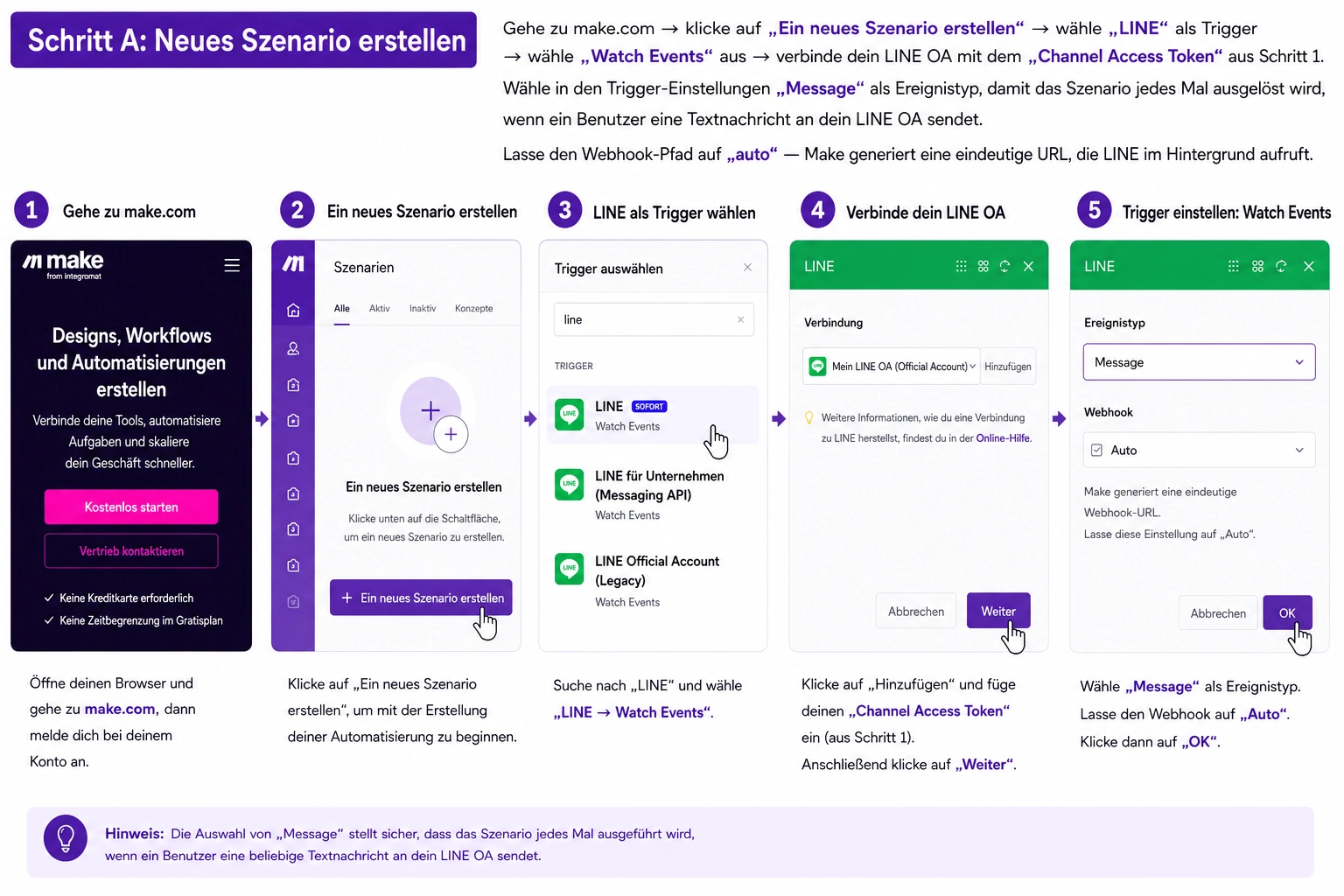
Step A: Create a New Scenario
Go to make.com → click Create a new scenario → select LINE as the Trigger → choose Watch Events → connect your LINE OA using the Channel Access Token from Step 1.
In the trigger settings, select "Message" as the event type so the scenario fires every time a user sends any text to your LINE OA. Leave the webhook path on auto — Make generates a unique URL that LINE will call behind the scenes.
 🔍 Click to enlarge
by Oh My Buddha
🔍 Click to enlarge
by Oh My Buddha
Step B: Add the OpenAI Module
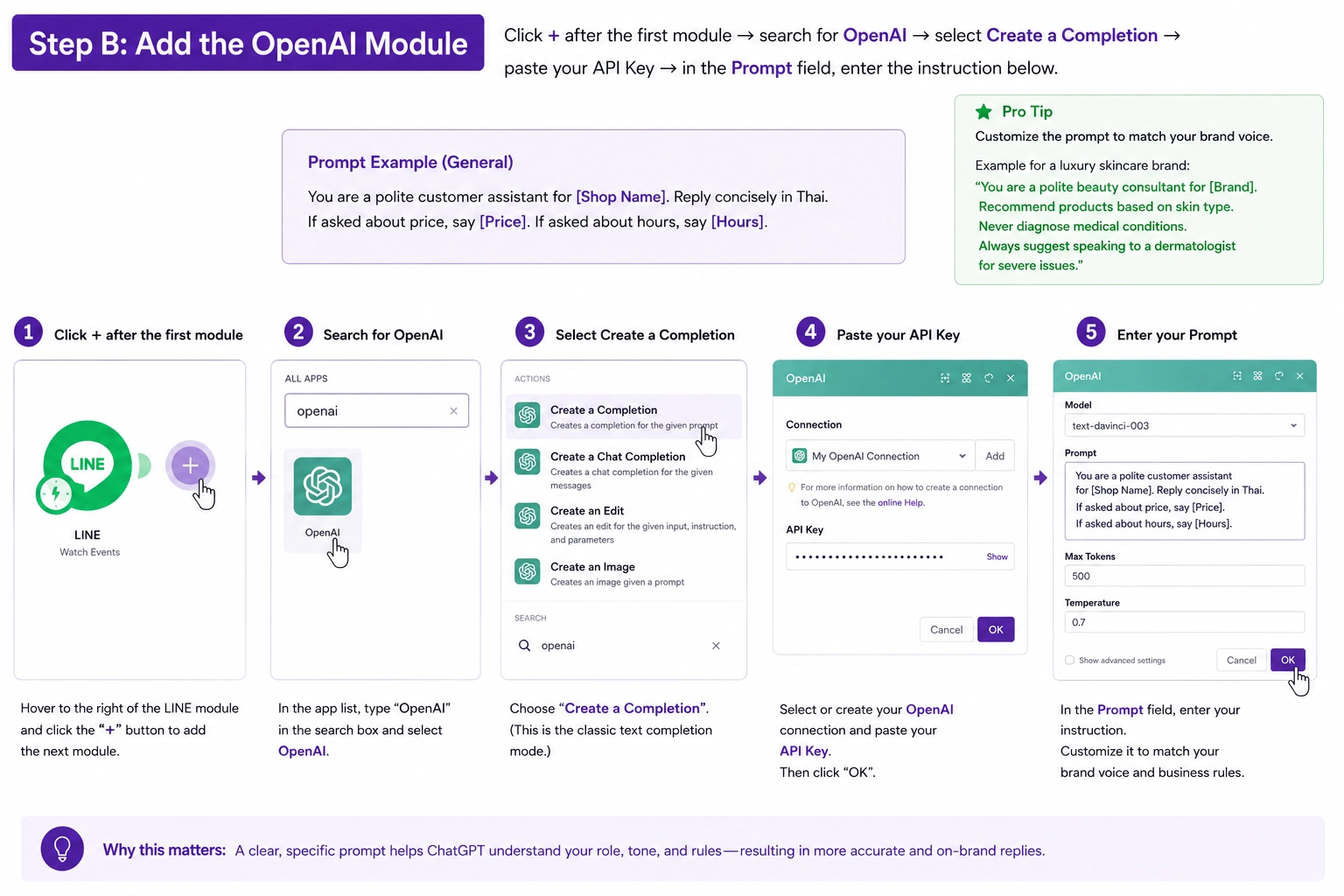
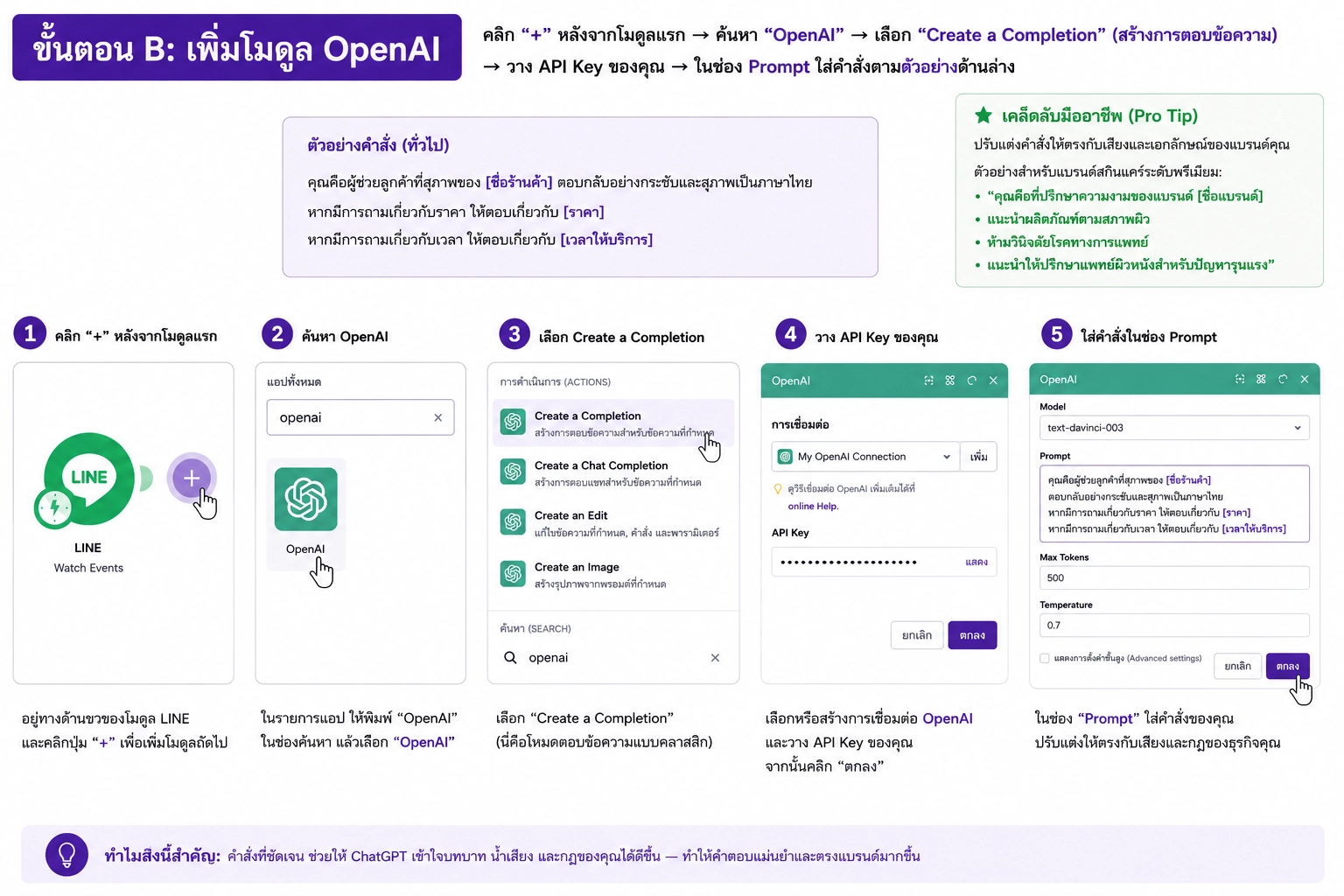
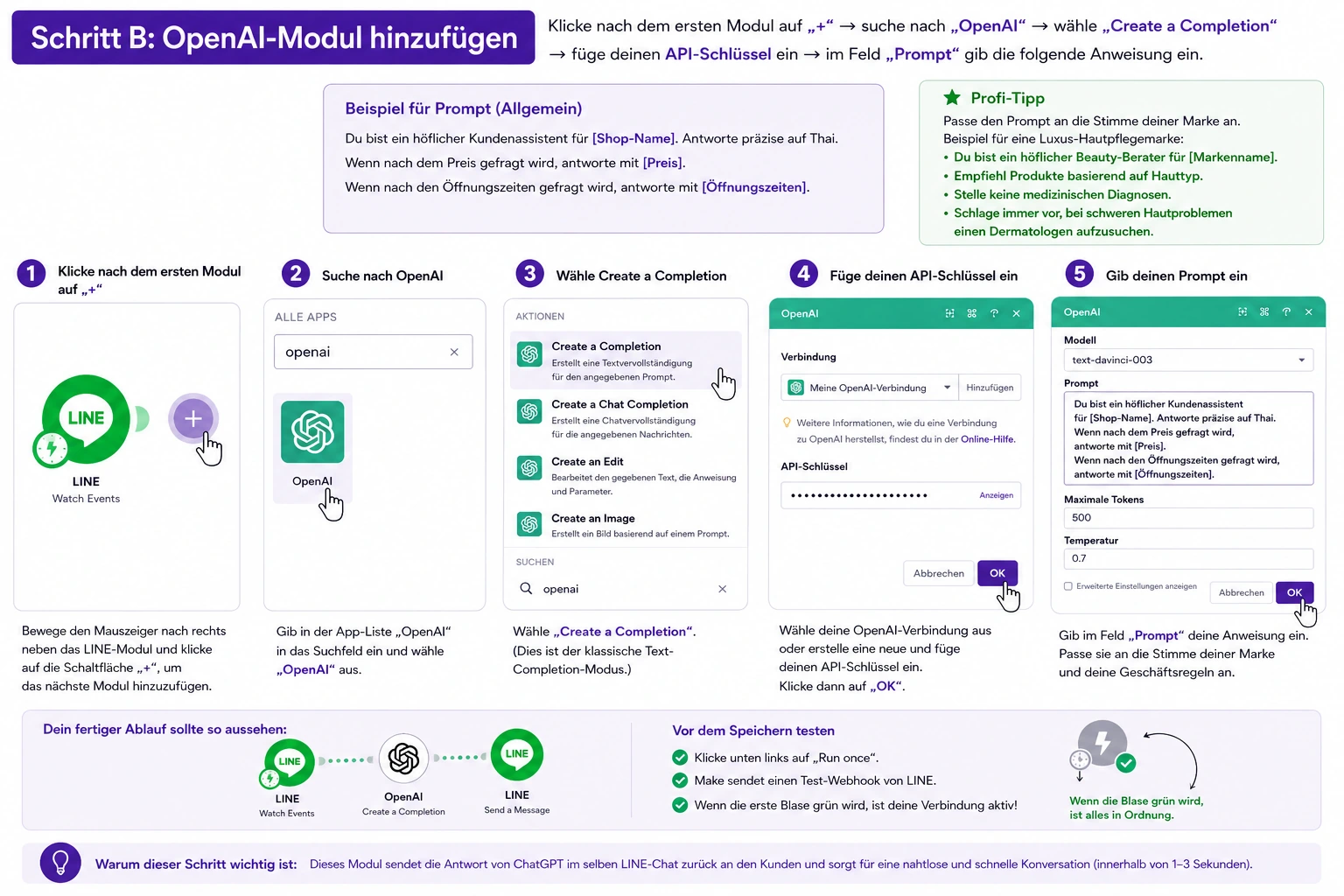
Click + after the first module → search for OpenAI → select Create a Completion → paste your API Key → in the Prompt field, enter:
You are a polite customer assistant for [Shop Name]. Reply concisely in Thai. If asked about price, say [Price]. If asked about hours, say [Hours].
Customize the prompt to match your brand voice. A luxury skincare brand might write: "You are a polite beauty consultant for [Brand]. Recommend products based on skin type. Never diagnose medical conditions. Always suggest speaking to a dermatologist for severe issues." The more specific your prompt, the fewer hallucinations ChatGPT produces.
 🔍 Click to enlarge
by Oh My Buddha
🔍 Click to enlarge
by Oh My Buddha
Step C: Send Reply Back to LINE
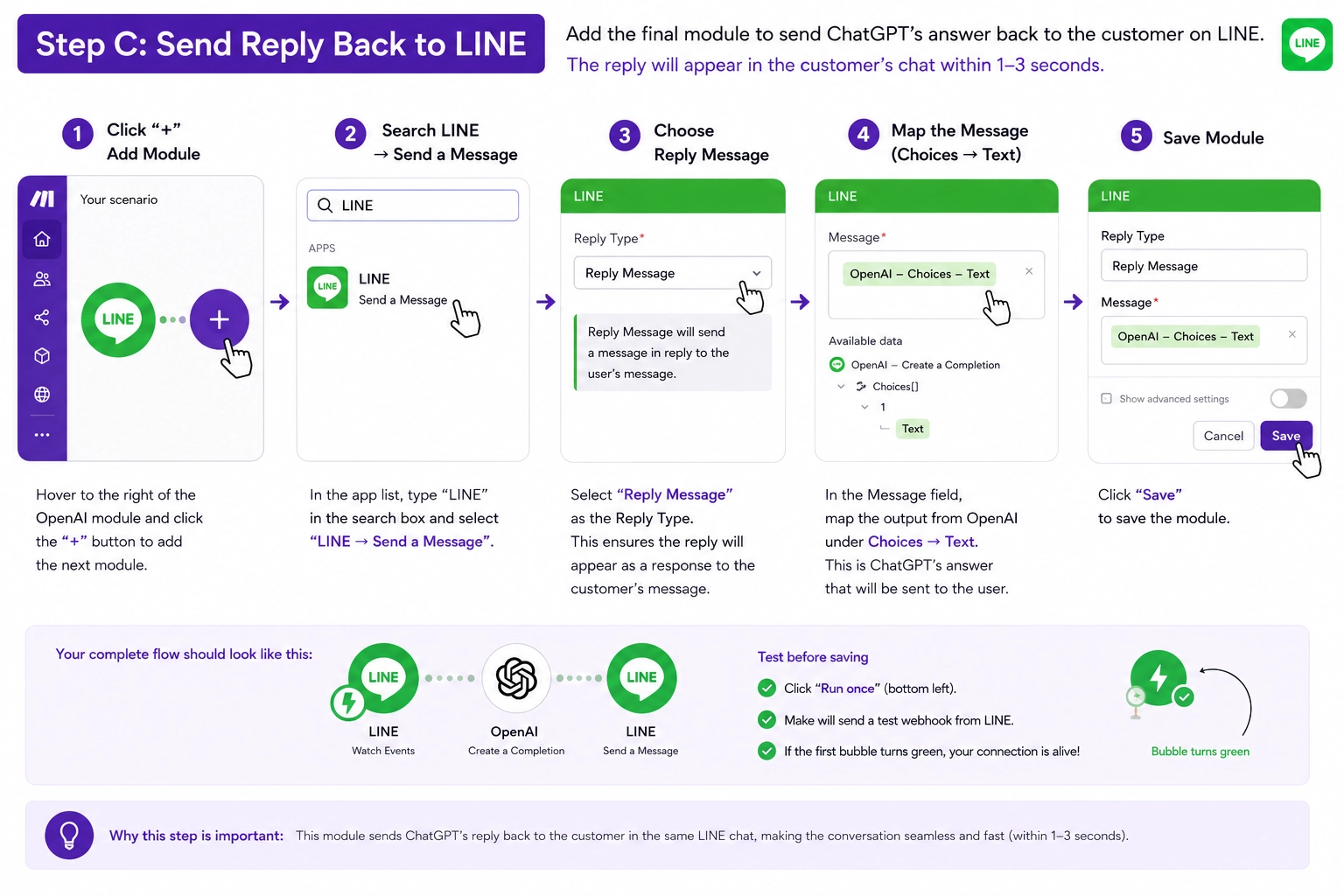
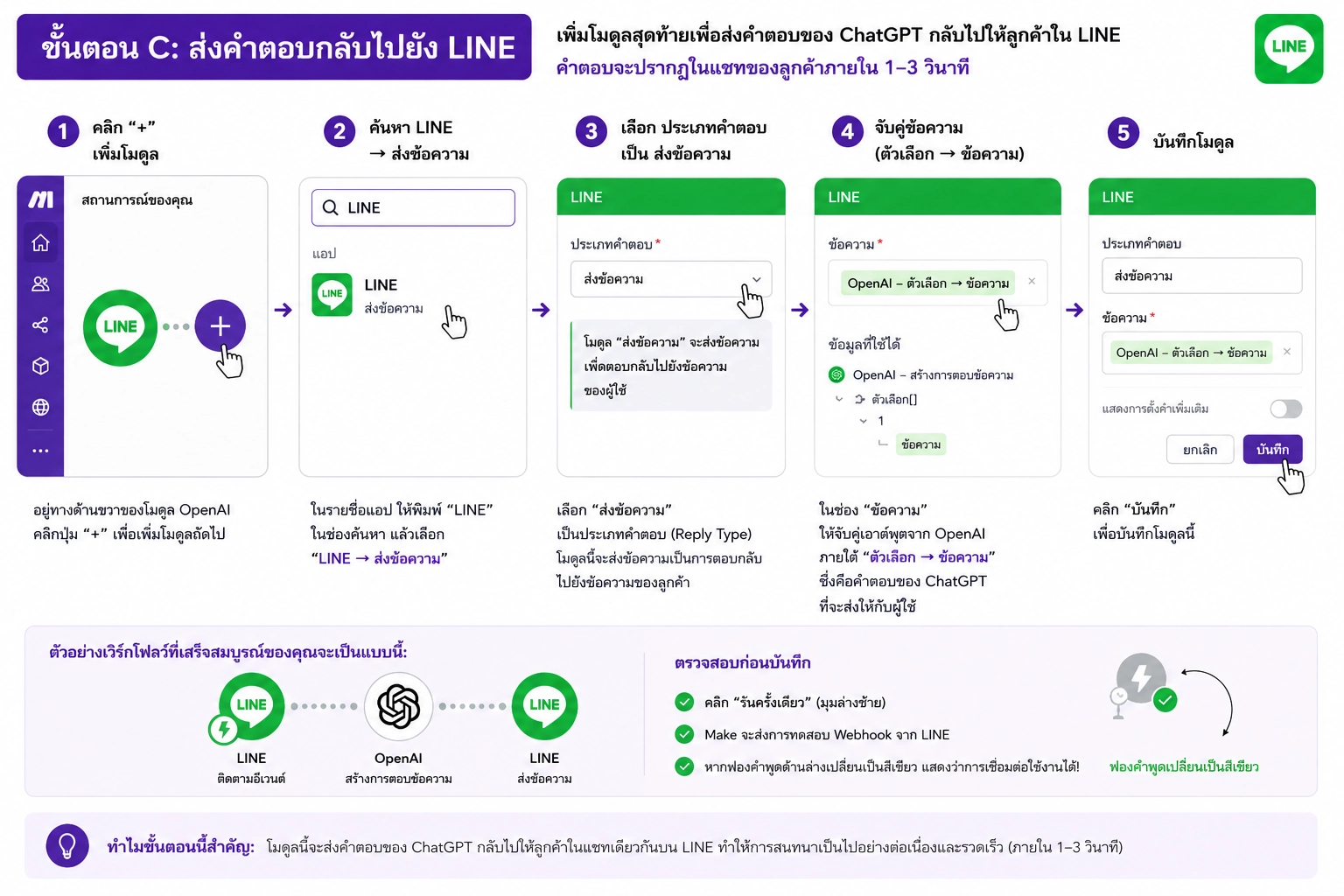
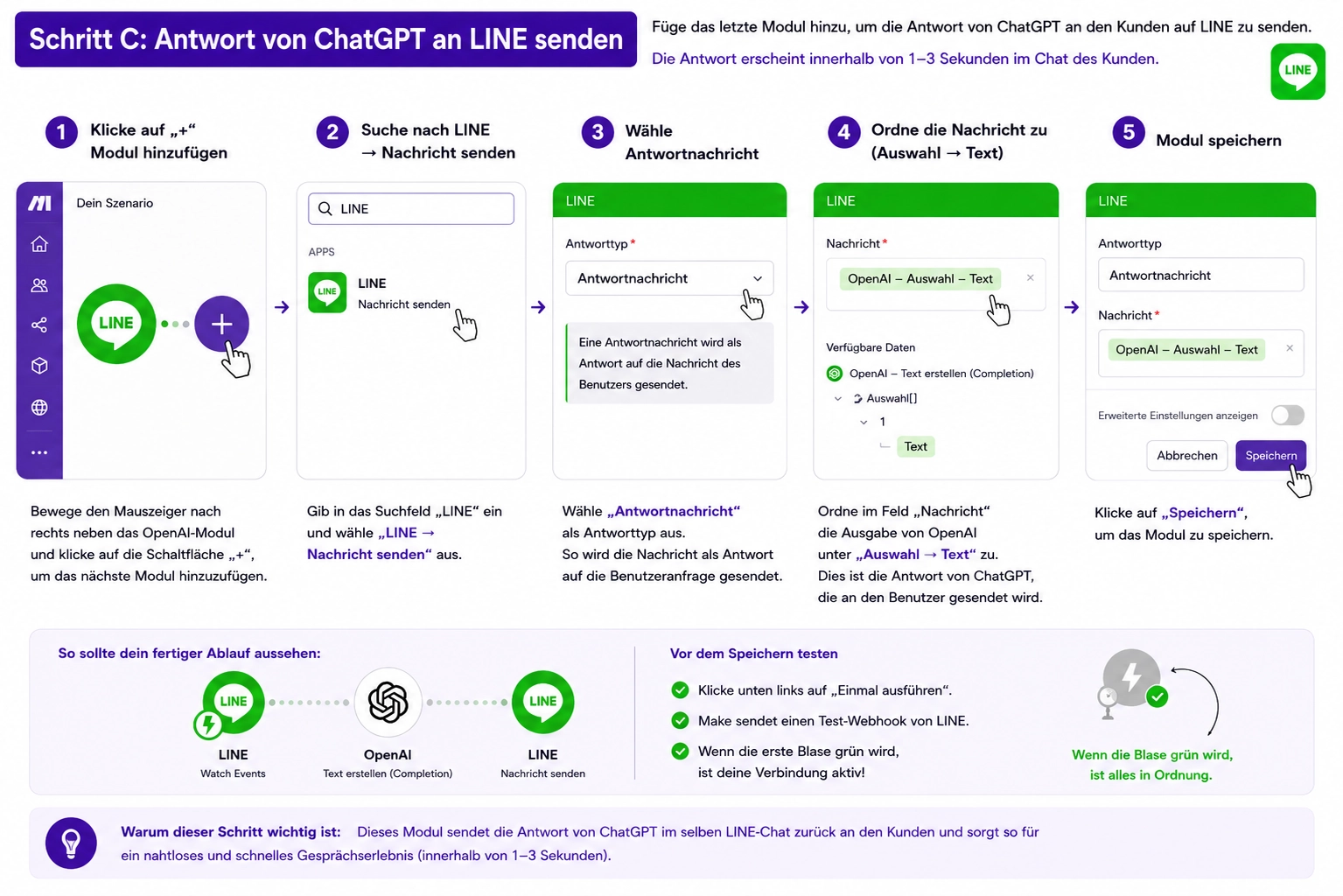
Add a final module: LINE → Send a Message → choose Reply Message → in the Message field, map the output from OpenAI (usually under Choices → Text). This ensures the customer receives ChatGPT's answer directly inside their LINE chat window within 1–3 seconds.
Before saving, click the Run once button at the bottom left. Make will prompt LINE to send a test webhook. If the first bubble turns green, your connection is alive.
 🔍 Click to enlarge
by Oh My Buddha
🔍 Click to enlarge
by Oh My Buddha
Step 3: Test and Fine-tune
Click Run once in Make → send a message to your LINE OA from another phone. If it replies = success! 🎉
If the answer isn't quite right, go back and refine your Prompt in OpenAI:
- "If the customer asks anything outside our products, reply: 'Sorry, please contact our staff for more details.'"
- "Keep answers under 2 sentences."
- "Add a smiley emoji 😊 at the end of every reply."
Common first-time errors: "Channel access token invalid" means you copied the wrong token from LINE — double-check you used the Messaging API tab, not the LINE Login tab. "Rate limit exceeded" means Make hit the free-tier cap; simply wait one hour or upgrade to Core ($9/month). Thai characters garbled? Ensure the OpenAI prompt explicitly specifies "Reply in Thai" and verify Make's webhook is set to UTF-8 encoding.
Next Level: 7 Real-World Use Cases
A basic auto-reply saves you time. But the real magic happens when you connect ChatGPT to your product catalog, booking calendar, or CRM. Thai businesses are currently using this exact integration to:
- Qualify sales leads automatically before human staff takes over
- Recommend products based on customer chat history and preferences
- Handle table reservations and appointment scheduling 24/7
- Send abandoned-cart reminders with personalized discount codes
- Conduct post-purchase satisfaction surveys in natural Thai
Continue to Part 2
Ready to transform your LINE OA from a simple chatbot into a full-service AI sales assistant? Our advanced guide walks through each use case with copy-paste prompt templates.
Explore 7 AI Use Cases →Important Notes
⚠️ Never publish your API Key on social media — anyone can use your credits.
⚠️ Make's free plan is limited to 1,000 ops/month. Upgrade if you get heavy traffic.
⚠️ ChatGPT can make mistakes. Have a human review answers periodically.
⚠️ Always disclose AI usage. Thai consumer protection laws encourage transparency. A simple "Powered by AI 🤖" footer builds trust.
Frequently Asked Questions
Is Make (Integromat) really free?
Yes. Make offers a free forever plan with 1,000 operations per month, which is sufficient for small businesses testing ChatGPT integration with LINE OA. Each incoming message + AI reply + outgoing message counts as roughly 3 operations.
Do I need coding skills to connect ChatGPT with LINE OA?
No. This guide uses no-code tools only: LINE Official Account Manager, Make (Integromat), and OpenAI API key. Everything is connected via drag-and-drop modules. If you can copy and paste text, you can build this chatbot.
Can ChatGPT reply in Thai?
Yes. In the OpenAI Prompt, simply specify 'Reply in Thai' or 'Respond in Thai language'. GPT-4o and GPT-3.5-turbo both support Thai language fluently, including informal speech, royal vocabulary, and regional slang.
How much does this cost monthly after the free credits?
For a Thai small business handling 500–1,000 LINE conversations monthly, expect to pay roughly 150–400 THB. Make's free tier covers the automation trigger. OpenAI GPT-3.5-turbo costs approximately $0.0015 per 1K tokens — in practical terms, a full customer conversation costs less than one Thai Baht. Compare that to hiring a customer service staff member at 12,000–15,000 THB per month plus social security and training costs.
Can I use this for multiple LINE Official Accounts?
Yes. Digital agencies and multi-brand owners can duplicate the Make scenario and simply swap the LINE channel connection in each copy. One OpenAI API key can power dozens of LINE OAs simultaneously. Add unique prompts for each brand so the AI adopts the correct tone — professional for a law firm, playful for a bubble tea shop, or technical for an IT consultancy.
Summary
Connecting ChatGPT to LINE OA requires no coding, no expensive software, and no technical background. In under 20 minutes, you've built an AI assistant that speaks Thai, works overnight, and scales automatically during busy campaigns.
Start with simple auto-replies today, then gradually add advanced features like lead scoring and product recommendations as your business grows. The businesses that adopt AI customer service now will own a massive competitive advantage in Thailand's increasingly digital marketplace. When your competitors are still manually copying and pasting replies at midnight, your bot will have already closed the sale and collected the customer's phone number for follow-up.
Want a Smarter AI Chatbot?
If your business needs an AI system connected to your product database, booking system, or purchase history analytics, we can design and develop it for you.
Get AI Consultation